Memory game with images
Using this block
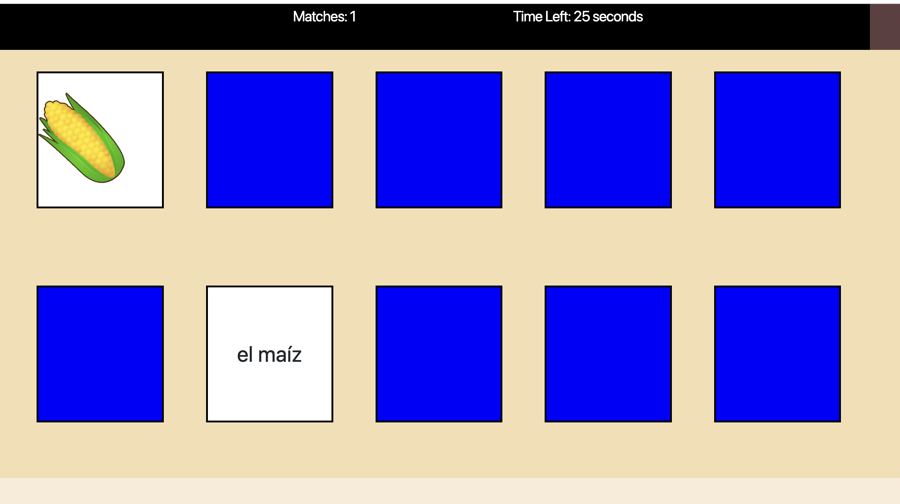
A version of the memory card game with 10 cards. One card is an image and the match is text. Players find all of the matches within the time limit.
Example Uses
This block is usually used in teaching vocabulary, both in English and in second language classes. It has also been applied in social studies, with historical figures or geographic landmarks matched with their description. It can be used for elementary math, for example, 3 x 3 and an image with 9 cats. For mathematics, also check the Memory Math block.
Making it your own
What’s in the block
Like every block, the Memory Images game block has two files in the folder:
- An HTML file: memory_images.html . You should not have to change anything in this file.
- A config file: memory_config.js – This is where you will make any changes to create your unique game.
As with most blocks, it also has an images folder. Any images used specifically in this block will be saved here. An audio folder contains a sound that plays when a match is found.
The config file
This block has only one config section, the options section where we add everything from the instructions to the images of the things that need to be whacked.
Page Options
As with all blocks, there is an options object. This contains instructions on how to play the game, where to go once it is over, what images and audio to use etc.
const options = {
    instructionsPage1: "<h3>Click on a card and then click on its match.</h3>" ,
    completionURL: "../next_block/next_block.html", // URL to proceed to after the block ends
    scoreLabel: "Matches",
    correct_sound: "audio/correct.wav" ,
    timed: 1 ,  // Change to 1 if you want the game to be timed
    seconds: 60, // Number of seconds if game is timed.
    successText: "You win!"

}- completionURL – you’ll see this in every block. It is the URL where you want to go on the completion of this assessment.
- scoreLabel: You probably just want to leave this as “Matches” unless your game is in a language other than English. This label shows at the top of the screen next to the number of matches found.
- correct_sound: Audio that plays when a match is found. You can leave this as is or replace with your own file you copy into the audio folder.
- seconds: How many seconds the player has to find all of the pairs.
- successText – Message shown when the player has found the number of matches.
Cards Array
The cards array object gives the images and alt text for the characters. It’s very simple to modify.
- card_front1: Give the link to the image for one card in the pair.
- alt: Provide alt text for the image.
- card_front2: Give the text for the second card in the pair.
const cards_config = {
    card_array: [
        {
            card_front1: "images/cake.jpg",
            alt: "cake",
            card_front2: "el pastel"
        },
        {
            card_front1: "images/corn.jpg",
            alt: "corn",
            card_front2: "el maíz"
        },
        {
            card_front1: "images/donut.png",
            alt: "doughnut",
            card_front2: "la dona"
        },
        {
            card_front1: "images/eggs.jpg",
            alt: "eggs",
            card_front2: "los huevos"
        },
        {
            card_front1: "images/grapes.jpg",
            alt: "grapes",
            card_front2: "las uvas"
        },
        {
            card_front1: "images/milk.jpg",
            alt: "milk",
            card_front2: "la leche"
        },
        {
            card_front1: "images/strawberry.jpg",
            alt: "strawberry",
            card_front2: "la fresa"
        }
    ]